1. BoostWP Originals
  2. BoostWP
Welcome Splash free download
// Latest Version

Welcome Splash Free

5,558 downloads

Welcome Splash is the oldest plugin on this site, April 2013.

Download v2.1.0Login to download free
Built and maintained by BoostWP Auto-updates with Boost Updater Unlimited websites
// Version //2.1.0
// Updated //Jun 14, 2026
// Developer //BoostWP
// Report //Some issue
// Download

Free Download Welcome Splash v2.1.0 (Latest Version)

Log in with a free account and the Download button gives you the zip. It's the file we built, nothing changed.

// Changelog

What's New in Welcome Splash v2.1.0

v2.1.0Released Jun 14, 2026
  • ReleaseWe haven't written up the v2.1.0 notes yet. If you need to know what changed before you update, ask in a ticket.
// Screenshots

Welcome Splash on a real site

Taken on a plain WordPress install with the current version. Click one to open it full size.

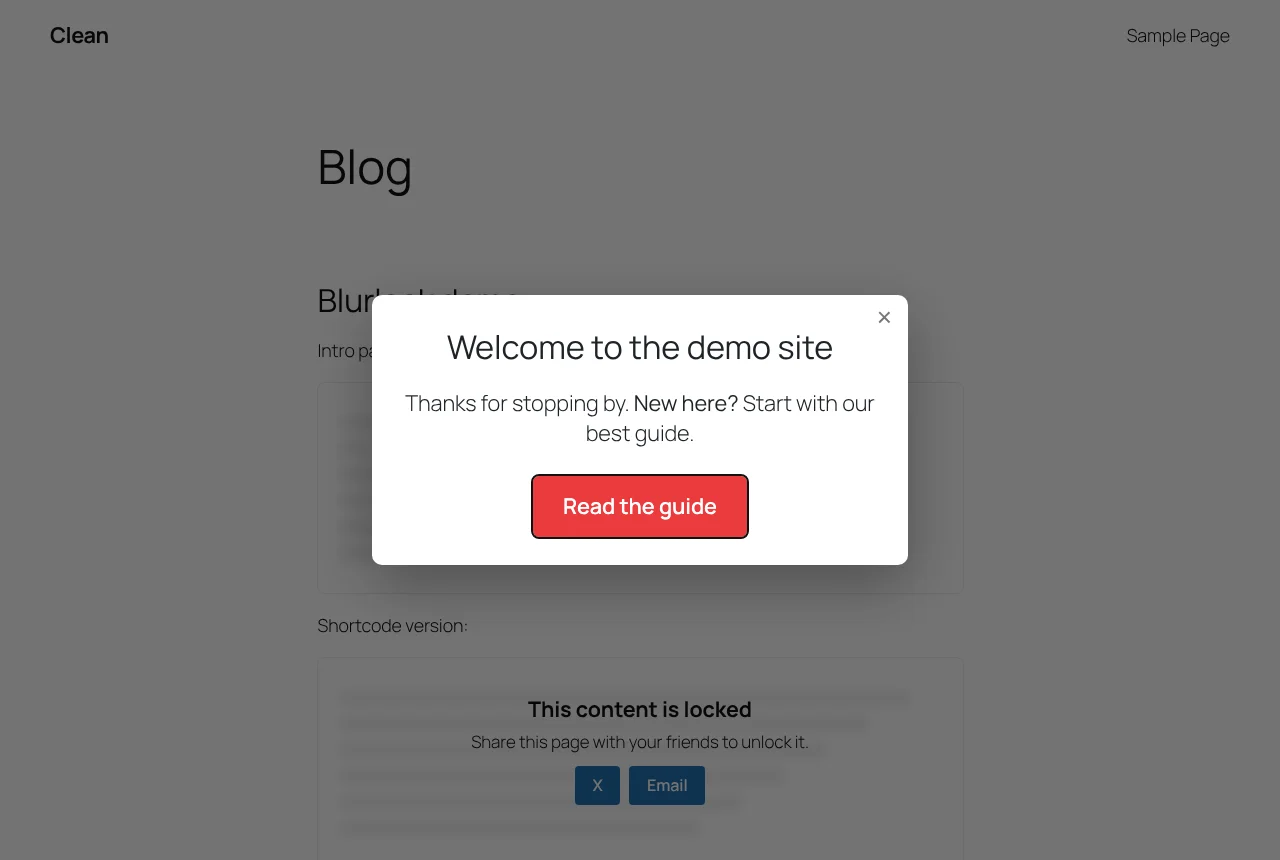
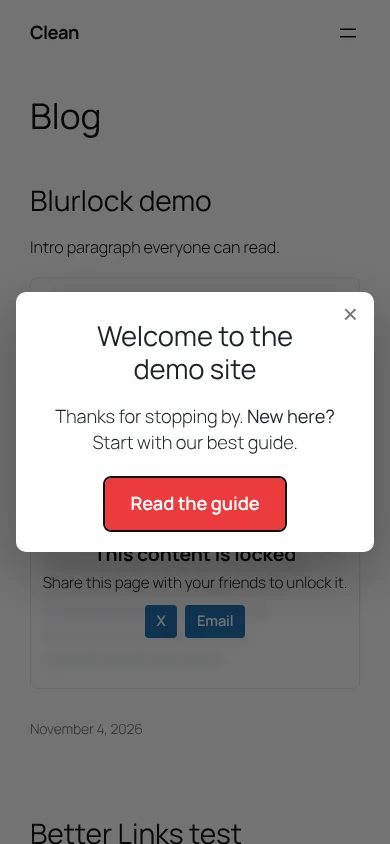
Welcome Splash: The splash on the front page
The splash on the front page.
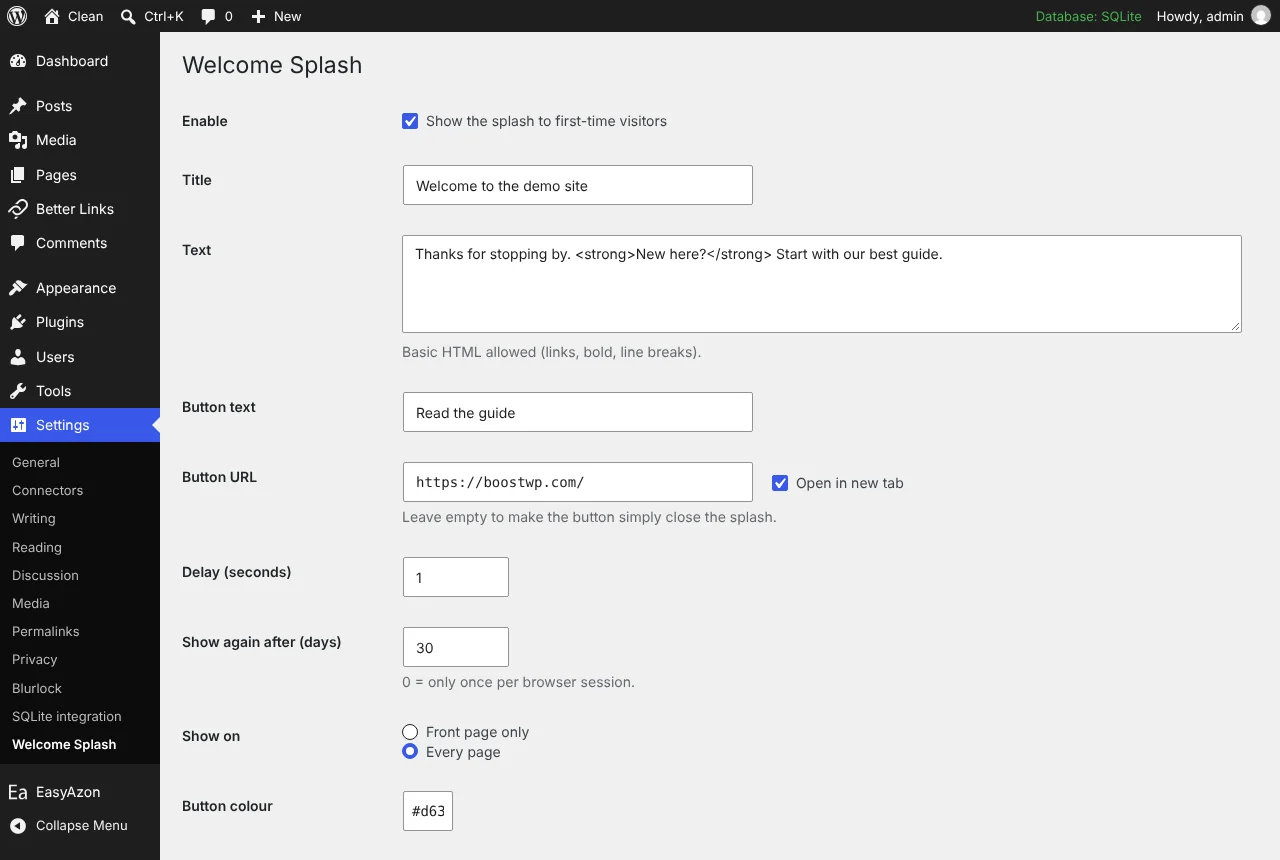
Welcome Splash: Welcome Splash settings page
Welcome Splash settings page.
Welcome Splash: The splash on a phone-sized screen
The splash on a phone-sized screen.

One modal for first time visitors

Welcome Splash is the oldest plugin on this site, April 2013. Back then it was a full-screen opt-in form you pasted your email provider’s code into. The 2.0.0 build is a different and smaller thing: a modal with a title, a short message and one button, shown to a visitor the first time they arrive and then not again for as long as you say. No builder, no template gallery, no form.

The settings page

Everything is under Settings, Welcome Splash.

  • Enable, title, text (basic HTML allowed)
  • Button text and URL; leave the URL empty and the button just closes the splash
  • Open the link in a new tab
  • Delay in seconds, so the page loads before the splash does
  • Days before showing again, where 0 means once per browser session
  • Front page only or every page
  • Button colour

Save, then open your site in a private window. If you would rather not log out, append ?welcome-splash=preview to any URL while logged in as an administrator and the splash is forced open.

How it remembers

When a visitor closes the splash, a welcome_splash_seen cookie is set carrying a hash of the current title, text and URL. Edit any of those and the hash changes, so everyone sees the new version once more. That is the whole memory system; no database rows per visitor, nothing sent anywhere. The modal markup is printed in the footer with hidden and the stylesheet and script are only loaded on pages where the splash can appear. When the plugin is disabled, nothing is added to the page at all.

Closing it

The X, the backdrop, the button or the Escape key. The dialog has role="dialog" and aria-modal, and focus moves to the button when it opens, so a keyboard user can press Enter and be on their way. It was checked at 390 px with no horizontal overflow.

Rules beyond front page or everywhere

There are none in the settings. For anything else, say only on posts in one category or never for logged-in users, use the welcome_splash_should_show filter and return false. If you want the old opt-in form, use your email provider’s embed inside a page and point the button at it; the splash will not collect addresses itself. Needs WordPress 5.0 and PHP 7.4; tested on WordPress 7.1.4 with PHP 8.3.
// Installation

How to install Welcome Splash

  1. 01

    Download the zip

    Download the zip from this page once you are logged in. Leave it zipped.

  2. 02

    Upload the plugin

    Plugins, Add New Plugin, Upload Plugin, pick the zip, Install Now.

  3. 03

    Activate

    Click Activate. Then set the title, text and button link in its settings. Change any of them later and everyone sees the splash once more.

  4. 04

    Keep it updated

    With Boost Updater installed, Welcome Splash updates from Dashboard, Updates like any other plugin. Without it, come back here for the next version.

// Technical Details

Welcome Splash specifications

// Version //2.1.0
// Last updated //Jun 14, 2026
// Developer //BoostWP
// Licence //GPL v2 or later
// Requires //None
// WordPress //5.0 or later
// PHP //7.4 or later
// FAQ

Welcome Splash Questions

What people ask about Welcome Splash before and after they install it.

Ask about Welcome Splash
01Do I need a licence key for Welcome Splash?

No key. Upload, activate, done. The only plugin here that asks for your account is Boost Updater.

02Does it slow the site?

One small stylesheet and one small script, and only on pages where the splash can appear.

03Can I show it only on some pages?

Front page or everywhere out of the box. The welcome_splash_should_show filter handles anything else.

04Is this the same file BoostWP releases?

It is. We build it, scan it and upload it to this page. Nothing gets added on the way.

05What happens to my settings on update?

They stay. WordPress keeps plugin settings in the database, and Welcome Splash doesn't touch them when it updates.

06Where do updates come from?

This page, or Boost Updater if you install it. Free accounts see the new version here; members can install it from the dashboard.

Welcome Splashv2.1.0 · 5,558 downloads
Download v2.1.0Login to download free