1. BoostWP Originals
  2. BoostWP
Pin Button Attraction free download
// Latest Version

Pin Button Attraction Free

4,320 downloads

Pin Button Attraction went up in August 2013, when Pinterest was sending real traffic to blogs and we wanted the Pin It button on the image itself rather than lost among the share buttons at the end of a post.

Download v2.3.1Login to download free
Built and maintained by BoostWP Auto-updates with Boost Updater Unlimited websites
// Version //2.3.1
// Updated //Oct 28, 2026
// Developer //BoostWP
// Report //Some issue
// Download

Free Download Pin Button Attraction v2.3.1 (Latest Version)

Log in with a free account and the Download button gives you the zip. It's the file we built, nothing changed.

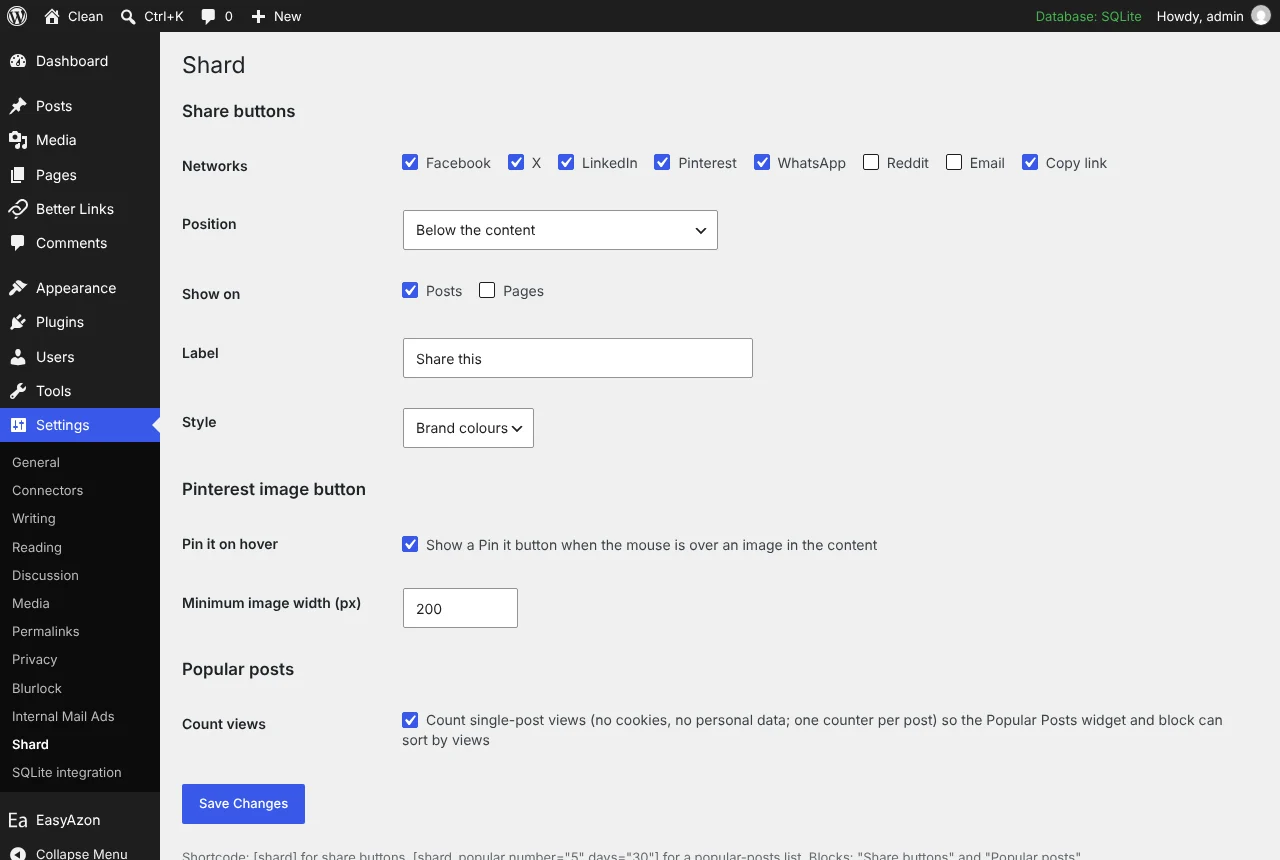
About this file. Pin Button Attraction is now part of Shard. The download on this page is the Shard plugin, which includes the Pinterest Pin it button that appears over your images, plus share buttons and a popular posts widget. Open Shard

// Changelog

What's New in Pin Button Attraction v2.3.1

v2.3.1Released Oct 28, 2026
  • ReleaseWe haven't written up the v2.3.1 notes yet. If you need to know what changed before you update, ask in a ticket.
// Screenshots

Pin Button Attraction on a real site

Taken on a plain WordPress install with the current version. Click one to open it full size.

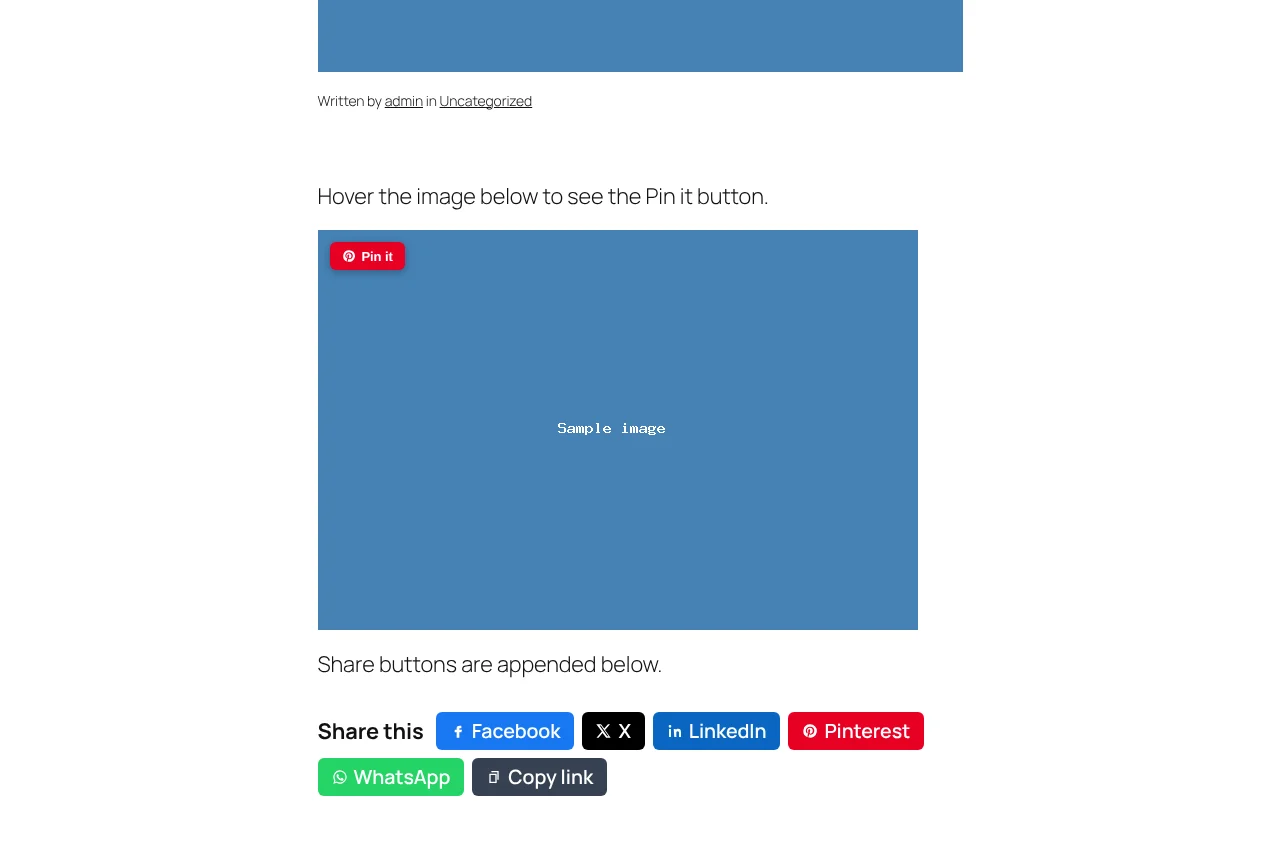
Shard: Share buttons below a post, with the Pin it button on an image
Share buttons below a post, with the Pin it button on an image.
Shard: Shard settings page
Shard settings page.

Pin Button Attraction is now part of Shard

Pin Button Attraction went up in August 2013, when Pinterest was sending real traffic to blogs and we wanted the Pin It button on the image itself rather than lost among the share buttons at the end of a post. It put a Pinterest button on every image on the site, or only the ones you picked, always visible or on mouse over, with a pin count beside it and a Follow link.

Pinterest closed the counts years ago (every network did), and the plugin had not kept pace with WordPress. So in November 2026 we rebuilt the sharing tools from scratch as one plugin, Shard 2.0, and this page now serves that file.

The feature you came here for is in it. Hover over an image in a post and a Pin it button appears over that image; clicking it pins the image with the post URL and the image’s alt text. You set the minimum image width under Settings, Shard, so icons and small thumbnails are left alone. It is a single floating element moved to whichever image the pointer is on, and it only shows on devices that can hover, so phones get no button. There is no always-on mode, no pin count and no Follow button any more.

Shard also gives you share buttons for eight networks and a popular posts widget, with no scripts loaded from the networks. Built for WordPress 7 and PHP 8.
// Video

See Pin Button Attraction in action

Erica Mueller shows how the Pin It button appears on images and how visitors use it.

// Installation

How to install Pin Button Attraction

  1. 01

    Download the zip

    Log in, then Download. WordPress wants the zip as it is, so do not unzip it.

  2. 02

    Upload the plugin

    Plugins, Add New Plugin, Upload Plugin, pick the zip, Install Now.

  3. 03

    Activate

    Click Activate. Then pick the networks and where the buttons go in its settings. The Pinterest hover button and the popular posts widget are separate switches on the same screen.

  4. 04

    Keep it updated

    With Boost Updater installed, Pin Button Attraction updates from Dashboard, Updates like any other plugin. Without it, come back here for the next version.

// Technical Details

Pin Button Attraction specifications

// Version //2.3.1
// Last updated //Oct 28, 2026
// Developer //BoostWP
// Licence //GPL v2 or later
// Requires //None
// WordPress //5.8 or later
// PHP //7.4 or later
// FAQ

Pin Button Attraction Questions

What people ask about Pin Button Attraction before and after they install it.

Ask about Pin Button Attraction
01What does the free account get me?

The current version of Pin Button Attraction and every other plugin here. Older versions and automatic updates are the membership part.

02Where are the share counts?

There aren't any. The networks closed or restricted their count APIs years ago, so Shard doesn't pretend.

03Can I place the buttons myself?

Set Position to only where you place the shortcode or block, then use the Share buttons block or [shard].

04Can I put it on client sites?

Yes, and you don't have to tell us. The GPL has no site limit.

05Is the zip modified in any way?

No. It's the file we built, scanned for malware and uploaded as is.

06How will I know when Pin Button Attraction updates?

Turn on the bell on this page and we email you. Members with Boost Updater see it in the dashboard like any other update.

Pin Button Attractionv2.3.1 · 4,320 downloads
Download v2.3.1Login to download free